Sunday, January 11, 2015

Free unlimited worldwide calls forever with Skype

Skype currently has a promotion: every Skype user gets a free month when they subscribe to Unlimited World Calling. With this subscription, you get unlimited free calls to landlines in 63 countries* and mobile numbers in 8 countries**. Every user can use this offer once.

If you play it smart, you can use this promotion to get free calls forever (until they cancel the promotion at least).

Here's what you should do:

1) Make a Skype account (or use your current one) and grab your free month here. You will need to enter your payment details but don't worry; they won't charge you anything until the beginning of the next month.

2) Cancel your subscription as soon as possible. If you forget to cancel it, they will automatically charge you for your next (paid) month of subscription after 27 days.

3) Make a new Skype account, name it something like username1 so it's easy to remember. Currently they don't seem to have a rule to prevent new accounts from using this promotion, but I think it's safer to make the new account on beforehand.

4) Make calls, enjoy life. Make sure to put a note in your calendar so you don't forget when your free month is over.

5) When your free month is over, get the promotion with your new Skype account. Repeat this process as many times as you want.

If you're using your Skype account for anything other than calling phone numbers, this approach might not look very attractive to you because you will have to use a different Skype account for calling phone numbers. Fear not, there is a solution to this. You can run two instances of Skype on your computer. For this, you should make two shortcuts on your desktop.

I'm sure that you know how to make a shortcut for Skype on your desktop. For the second instance of Skype, just make a second shortcut and enter /secondary at the end of the target address. It will look like this:
32 bit:
"C:\Program Files\Skype\Phone\Skype.exe" /secondary
64 bit:
"C:\Program Files (x86)\Skype\Phone\Skype.exe" /secondary
Now you can have two instances of Skype running: use one for calling phone numbers and one for your normal Skype stuff. This approach is working perfectly for me so far. Let me know if you experience any problems with this.

*Countries with free landline calls: Andorra, Argentina, Australia, Austria, Belgium, Brazil, Brunei, Bulgaria, Chile, Colombia, Costa Rica, Croatia, Czech Republic, Denmark, Estonia, Finland, France, Germany, Greece, Guadeloupe, Hungary, Iceland, Indonesia (Jakarta), Ireland, Republic of Ireland, Israel, Italy, Japan, Korea, Latvia, Lithuania, Luxembourg, Malaysia, Malta, Mexico, Morocco, Netherlands, New Zealand, Norway, Panama, Paraguay, Peru, Poland, Portugal, Romania, Russia, Slovakia, Slovenia, South Africa, Spain, Sweden, Switzerland, Taiwan, Turkey, United Kingdom, Venezuela. 

**Countries with free mobile calls: Canada, China, Guam, Hong Kong SAR, Puerto Rico, Singapore, Thailand, United States.

Saturday, January 10, 2015

My Red Cherry Shrimps

It's about time that I post another aquarium update.

Well, I have red cherry shrimps now. I really struggled to find male shrimps. When I went to the aquarium store, I asked for a mix of males and females. The seller didn't seem to know the difference between males and females. So I made sure that I got a few that had a male-like appearance and waited. After a few months, all 10 of my shrimps had the "saddle". This is the white line of unfertilized eggs that appears on the neck of female shrimps. So yeah...all my shrimps were female. Then I went to another shop, got 4 more shrimps. Again, all female. I figured that stores don't sell males here, either because they are less colorful or because they don't want people to breed shrimps themselves.

Please enjoy some pictures of my virgin female shrimps:


And here, a picture of the ugliest female shrimp in the world, it's basically a man with eggs:


My females were in a desperate need for some male companions. My solution was buying some more shrimps, this time from a private seller. If you buy from a private seller, you can be sure that they have both males and females because they are breeding these shrimps themselves at home. A friendly woman came to my house to drop off these:


Baby males! Less than 2 weeks later, my females were pregnant with eggs, also called "berried" because the eggs look like berries. Interestingly, the eggs have different colors depending on the female. I had some with light eggs, some with dark eggs:


After that, my shrimps have been living happily ever after. They like eating shrimp pellets, but also fish flakes and vegetables like broccoli:


Sunday, March 9, 2014

Adding custom dictionaries to Kobo devices

I recently bought a Kobo Glo. Great little e-reader, that one.

I spent a while struggling to figure out how to install a Turkish-English dictionary on it, because it's not supported by default. I decided to write a little tutorial about installing other dictionaries on a Kobo device, in case I or anyone else ever need it to do this again.

Check whether the dictionary you want is already available

1. Check here whether Kobo already made the dictionary you want. If yes, download the file, connect your Kobo device to your computer and place it in the ".kobo\dict" folder and you are done. If not, go to step 2.

2. Check here whether someone else already made a custom dictionary for the language pair you want. If so, you can skip to step 13 for instructions on how to put the file on your Kobo device.

Make a custom dictionary

3. Download the dictionary you want in StarDict format. This website has a lot of dictionaries.

4. Unzip it the .tar dictionary file. You will get a .dz, .idx and .ifo file. Rename the .dz file to .gz. Extract the .gz file so you end up with a .dict file. Give the .dict, .ifo and .idx representative names, eg. tur_en.dict, tur_en.idx, and tur_en.ifo.

5. Go here and download the latest version of Penelope.

6. Unzip the Penelope script and place it in the folder of your choice, for example "c:\Penelope". Put the dictionary files in the same folder as the Penelope files.

7. Install Python 3.3.4.

8. Download the marisa.zip file here or here. It containes two Windows executables It was built from open source Marisa code by the user EbokJunkie on mobileread.com. Penelope script invokes these executables. You can put them anywhere; I put them to "C:\tmp".

9. Right click the file penelope3.py and choose Edit with IDLE. Find the variables MARISA_BUILD_PATH and MARISA_REVERSE_LOOKUP_PATH and set their location to "c:/tmp/marisa-build.exe" and to "c:/tmp/marisa-reverse-lookup.exe" respectively, or wherever you saved the marisa files. Save penelopa3.py.

10. Open the command prompt and make the Penelope folder your current folder by typing the command "cd c:\Penelope".

11. Type the following command to start the conversion: "penelope3.py -p tur_eng -f tur -t eng --output-kobo". Replace the variable "tur" with the language you want to translate from and "eng" with your target language.

12. You will end up with a Kobo dictionary file now, for example dicthtml-tur-eng.zip.

Transfer the dictionary file to your Kobo device

13. Connect your Kobo device to your computer and go to the ".kobo\dict" folder on the reader.

14. In order to get your Kobo device to recognize the dictionary files, you have to use it to replace an existing original dictionary. To do this, you have to use the file name of an existing original dictionary. For example, I don't use the Spanish dictionary, so I renamed the file "dicthtml-es-en.zip" on my Kobo device to "dicthtml-es-en-backup.zip", so I will still have a backup in case I need it later. Then I renamed my Turkish-English dictionary to "dicthtml-es-en.zip".

15. Unplug your Kobo device, tap a word in a book and use the "Spanish" dictionary to look up words in your dictionary.

Credits:

Monday, December 9, 2013

Propagating African violets

This is the newest addition to my plant family: a beautiful blue miniature African violet.


I wanted to try propagating this plant by taking leaf cuttings. This is what I did:

Cut a few leaves from the plant. I've read that it's recommended to take the leaves at the bottom of the plant, not the center. The stalk should look like this:

18/03/12

Put them in moist pot soil. The soil shouldn't be too wet, but don't let it dry out either.


2-4 weeks later, roots will start to develop at the base of the stalk.

05/04/12

Saturday, May 19, 2012

Torchlight 2 beta screenshots

So I'm lucky enough to be in the torchlight 2 closed beta. And since there's no NDA (NDA are for babies!), I'm free to share whatever I want about it. Maybe I'll write a proper review later, but I can tell you that it is totally awesome. The beta takes about 6 hours to complete and is the first act of the game. There will be 3 acts in the game, plus a 4th boss act, and a lot of end game content.


Saturday, April 14, 2012

Cheat to max out your Dropbox referral space


I love dropbox. It has really helped me synchronize important files between computers, while making an online backup of everything. But because the 2 gb free space that you get on a basic account isn't enough for me, I've been looking for ways to increase it. Of course there are the normal ways to increase your dropbox space, described here. You can get 16 gb extra space by referring 32 people, but this is hard to do if you're friendless like me. I found a way to cheat the referral system here and here. The steps on these pages seem a bit outdated though, so I decided to rewrite it a bit according to my own experiences. Who knows, maybe it can help someone.

Let me start by saying  that if you have friends that could use dropbox, you should really just get them to try it out. If you have the money (and aren't a cheapskate like me), just pay for a pro account. If you're afraid of getting your account banned, don't do this either.

1. Sign in with your account on dropbox.com. Save your referral link.

2. Download virtualbox and install it.

3. Download an Ubuntu iso (you can also use any windows or linux iso/cd if you want)

4. In virtual box manager, create a virtual machine for your ubuntu iso by pressing "New" and following the steps

5. Start the virtual machine. In the first run wizard, select the ubuntu iso as your installation media. The virtual machine will now load using the ubuntu iso.

6. On the ubuntu welcome screen, choose "try ubuntu". Ubuntu will now start up.

7. In ubuntu, open firefox and go to dropbox.com. Download dropbox for ubuntu. (Download -> ubuntu 32 or 64 bit -> open .deb file in ubuntu software center -> in software center, click install)

8. Run dropbox. On the startup screen, choose "I already have a dropbox account".

9. Make a snapshot of the current state. (In the virtualbox menu: Machine -> Take Snapshot)

10. Use your referral link to sign up for a dropbox account. You don't have to use an existing email address to sign up, it will just accept anything that looks like one. You can either do this step in your normal OS or in virtualbox itself.

11. Enter the email address and password of the account that you just created. Click forward. Now you should've gained 500 mb extra space on your original dropbox account.

12. Close the virtual box and return it to the snapshot (Machine -> Close -> Power off Machine & select Restore current snapshot)

13. In the virtualbox manager, start the virtual machine again by pressing start.

Repeat steps 10-13. It should only take a few minutes per referral, so it's fast enough to do once you've set it up.

EDIT: As suggested in the comments, you can try a combination of these solutions between every try if it doesn't work for you:
-change the mac address of the virtual machine
-change your IP address
-boot back to the live cd and continue from step 5

Please stop spamming this post with referral links.

EDIT2: Maybe you should consider using Copy instead of Dropbox. Copy offers 15 GB of free space and 5 GB per referral. If you sign up using a referral link, you also get 5 GB extra space to start with. Here is my referral link if you're interested.

Wednesday, February 1, 2012

Tarepanda amigurumi

I've always loved tarepanda, the cute lazy panda. Lately, I've started making amigurumi (crochet dolls) and I really wanted to make a tarepanda one. I found the Japanese pattern here. At first, the Japanese pattern had me puzzled because I'm a noob at handwork and I had never seen any kind of pattern before, let alone in Japanese. But after reading this guide, it all makes sense to me. There seem to be some people that want this pattern written out in English though, so I'll do my best to write it out. If you see any mistakes or have suggestions, let me know so I can improve it.


You'll need white and black wool for this. Everything that should be black is highlighted in black, the rest is white. In the Japanese pattern, every round was joined with a slip stitch, but I didn't do that because it didn't seem necessary. You only really have to use slip stitch to join in the two round before you switch between colors in the body or it will look odd, so I wrote that in my pattern.

Explanation of terms used

Ch = chain
Circle = magic circle
Sc = single crochet
Sc-increase = increase single crochet
Sc-decrease = decrease single crochet
Dc = double crochet
Dc-triple = 3 double crochets inserted in the same stitch
Half-Dc = half double crochet
Half-Dc-increase = two half double crochets inserted in the same stitch

Head

Ch 14
1) 30x Sc (14 on each side of the chain and 1 extra at both ends) = 30
2) Sc-increase, 12x Sc, 3x Sc-increase, 12x Sc, 2x Sc-increase = 36
3) Sc-increase, 13x Sc, 2x (Sc-increase, Sc), Sc-increase, 13x Sc, 2x (Sc-increase, Sc) = 42
4) 2x Sc, Sc-increase, 14x Sc, 2x (Sc-increase, 2x Sc), Sc-increase, 14x Sc, Sc-increase, 2x Sc, Sc-increase = 48
5) 48x Sc = 48
6) Sc-increase, 15x Sc, 2x (Sc-increase, 3x Sc), Sc-increase, 15x Sc, 2x (Sc-increase, 3x Sc) = 54
7) - 8) 54x Sc = 54
9) 2x Sc, Sc-increase, 16x Sc, 2x (Sc-increase, 4x Sc), Sc-increase, 16x Sc, Sc-increase, 4x Sc, Sc-increase, 2x Sc = 60
10) - 14) 60 Sc = 60
15) 4x Sc, Sc-decrease, 16x Sc, 2x (Sc-decrease, 4x Sc), Sc-decrease, 16x Sc, Sc-decrease, 4x Sc, Sc-decrease = 54
16) 3x Sc, Sc-decrease, 15x Sc, 2x (Sc-decrease, 3x Sc), Sc-decrease, 15x Sc, Sc-decrease, 3x Sc, Sc-decrease = 48
17) 2x Sc, Sc-decrease, 14x Sc, 2x (Sc-decrease, 2x Sc), Sc-decrease, 14x Sc, Sc-decrease, 2x Sc, Sc-decrease = 42
18) Sc, Sc-decrease, 13x Sc, 2x (Sc-decrease, Sc), Sc-decrease, 13x Sc, Sc-decrease, Sc, Sc-decrease = 36
19)  Sc-decrease, 12x Sc, 3x Sc-decrease, 12x Sc, 2x Sc-decrease = 30
20) Sc-decrease, 11x Sc, 2x Sc-decrease, 11x Sc, Sc-decrease = 26
Sew the head closed

Body

Ch 12
1) Sc 26 (12 on each side and 1 extra on each end) = 26
2) Sc-increase, 10x Sc, 3x Sc-increase, 10x Sc, 2x Sc-increase = 32
3) Sc-increase, Sc, 3x half-Dc, 4x Dc, 3x half-Dc, Sc, Sc-increase, half-Dc-increase, Dc-triple, half-Dc-increase, 12x Sc, half-Dc-increase, Dc-triple, half-Dc-increase = 42
4) 2x half-Dc, half-Dc-increase, 3x half-Dc, 4x Dc, 3x half-Dc, half-Dc-increase, 2x half-Dc, Sc-increase, 2x Sc, Sc-increase, 18x Sc, Sc-increase, 2x Sc, Sc-increase = 48
5) 6x (Sc-increase, 7x Sc) = 54
6) - 10) 54 Sc = 54
11) 6x (7x Sc, Sc-decrease) = 48
12) - 14) 48 Sc = 48
15) 6x (6x Sc, Sc-decrease) = 42
16) - 17) 42 Sc =  42
18) Sc-decrease, 4x Sc, 2x(Sc-decrease, 5x Sc), Sc-decrease, 4x Sc, Sc-decrease, Sc, 6x Sc, Sc-decrease, 5x Sc, join with slip stitch = 36
19) 23x Sc, 8x Sc, 5x Sc, join with slip stitch = 36
20) 36 Sc = 36
21) 6x (4x Sc; Sc-decrease) = 30
22) 30 x Sc = 30

The extra black in 18) and 19) should be in the middle of the tummy. When I made my panda, this didn't work out, so you might have to adjust the pattern a little so it's in the middle.


Arm (make 2)

Circle 6
1) 3x (Sc-increase, Sc) = 9
2) 3x (Sc-increase, 2x Sc) = 12
3) - 7) 12 Sc = 12

Leg
(make 2)
Circle 6
1) 3x (Sc-increase, Sc) = 9
2) 9x Sc = 9
3) 3x (Sc-increase, 2x Sc) = 12
4) 12x Sc = 12
5) 3x (Sc-increase, 3x Sc) = 15
6) 3x (Sc-increase, 4x Sc) = 18

Ear
(make 2)
Circle 6
1) 6x Sc-increase = 12
2) - 3) 12x Sc = 12

Tail


Circle 6

1) 6x Sc-increase = 12
2) 12x Sc = 12


Attach the head to the body; the slit where you closed the head should be on the bottom. Then you can attach the arms, legs, ears and tail. Finally, you can make the eyes out of black and white felt and glue them on. Look at the following images for reference. You can print this on an A4 paper to get the shape of the eyes right.


Wednesday, November 16, 2011

java fern plantlets

So my java ferns are starting to produce little plantlets on their leaves. I don't know whether this is a last attempt to get some offspring before they die, or because they are flourishing in my aquarium and are thus healthy enough to produce offspring. They do have some brown spots on their leaves, but apparently that's normal for java fern, so I don't know...

For now, I'm just happy to have baby plants and hopefully I'll be able to pluck them off the mother plant soon, so I can try to plant them.


Monday, October 31, 2011

virtual life

I'm a real sucker for artificial life games, although it seems like no one makes them anymore. My favorite game of all time is Creatures 2. It had 3 species of creatures: the cute Norns, the industrious Ettins and the dangerous Grendels. Each individual creature has it's own digital DNA, with genes that control their biochemistry, organs, brains and appearance.

Creatures 2 Ettin, Grendel and Norn
Raising Norns was a challenge, they were very dumb and hard to keep alive. It wasn't uncommon for a Norn to die of starvation, surrounded by cheese blocks, and me telling it to "EAT FOOD", damnit. But all those hardships made it so much more rewarding. They lived in a world that had an interesting ecosystem: plants, insects and animals that lived their own life cycle, independent of what the player is doing, though you could also influence them. There was a splice machine, vulcano, oceans, deserts... I loved this game so much that I started working on my own Norn breed, which looked like red squirrels, although I never finished it.

my  own Norn breed

Now, it's about 10 years ago that the last creatures game was released. The docking station servers are down, downloadable content is no longer available, none of the games work properly on the newer operating systems anymore...the games are truly dead. And there haven't been any new games in the artificial life genre that I know of. It seems to be a niche that no one cares about, and no one wants to develop games for. It's such a wide, open field,  with a lot of possibilities...It's a shame. I wish that I was a programmer, so I could develop my own artificial life form.

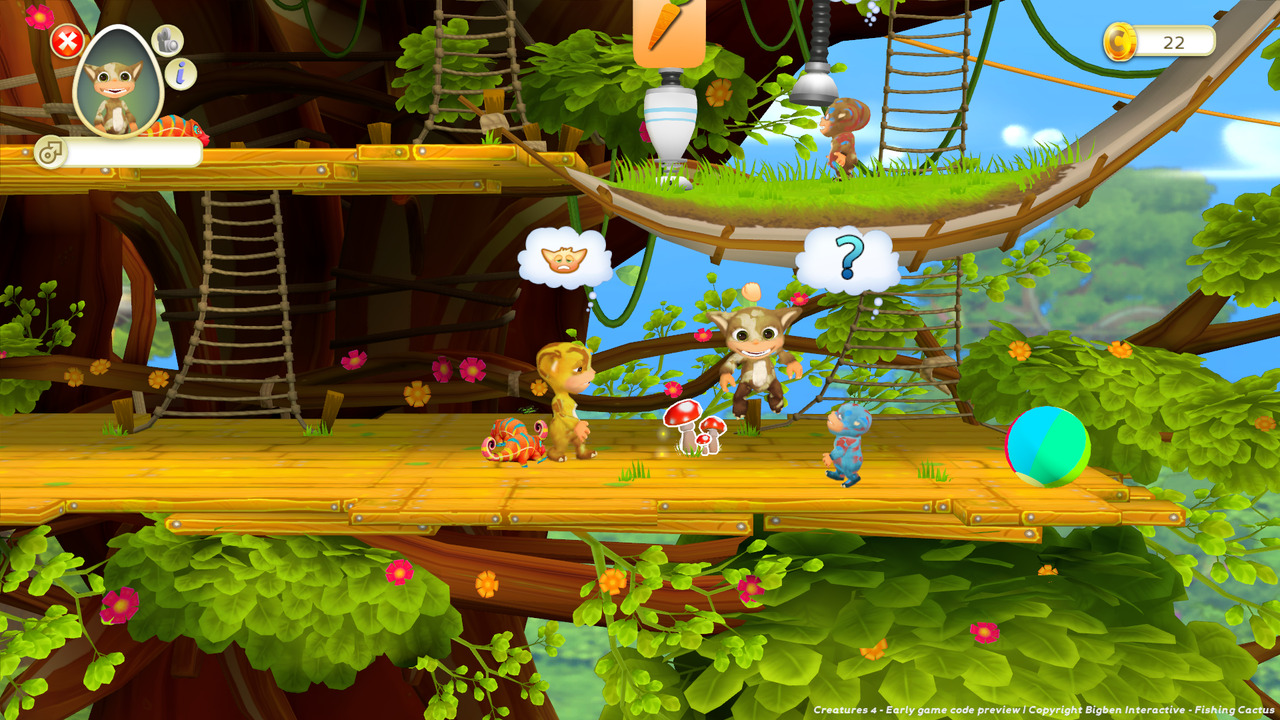
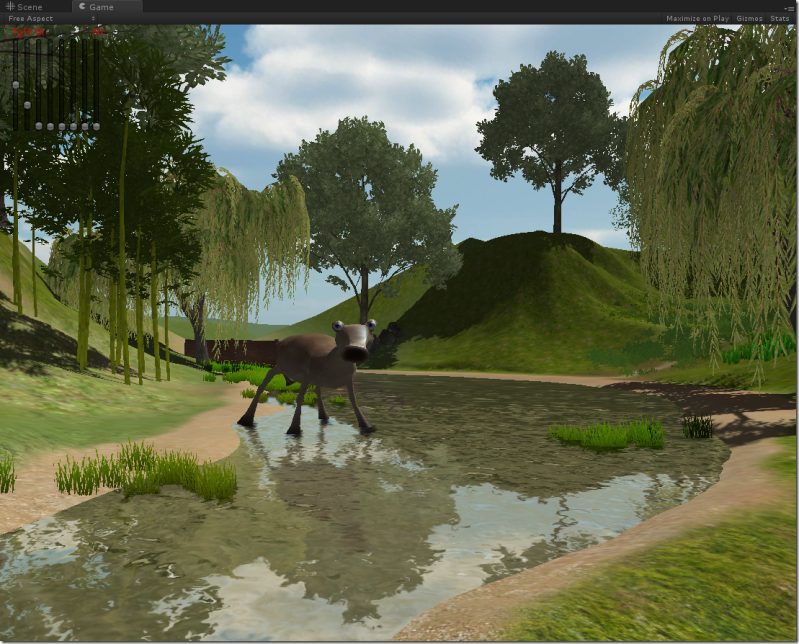
Currently, a new Creatures game, Creatures 4, is being developed by the Belgian indie game studio Fishing Cactus. I've never heard of them, but I hope that they'll do a good job. The game should be released early 2012.
The graphics look very simplistic and colorful. This isn't necessarily a bad thing, but I just hope that it's not an indication that the rest of the game will be simple, childish and lax any complexity. The Norns look so different from all the previous games. They just aren't cute. Their eyes are too small, and they look like little trolls. On top of that, there won't be any Ettins and Grendels in this game. I just hope that they don't downgrade the importance of ecology, biochemistry and genetics, which were very present in the previous games. I'm a little concerned because only genetic feature that I've heard them talk about in their interviews is colour... Let's hope that they didn't dumb it down to just that.


After I found out about the new Creatures game, I started playing Creatures 3 again. Boy, what I've seen of Creatures 4 looks very bad compared to it predecessor. But there's another type of virtual life being developed that looks a lot more promising...Grandroids!


This is a new game/research project of Steve Grand, the person that was responsible for making the artificial life engine used in the Creatures series. It will have real virtual alien life forms that can live in a virtual world.

I'm not talking about a computer game designed to simulate lifelike behavior; I mean genuine artificial life. I mean virtual creatures constructed from complex networks of virtual brain cells and biochemical reactions and genes. They'll learn things for themselves and have their own thoughts. I don't program them to behave in a certain way - they make their own decisions. If they get sick it will be because something has disturbed the delicate balance of their biochemistry, and remedies must be discovered that can rebalance it. If they evolve new traits or suffer from unknown hereditary diseases it'll be because nature has taken its course, not because it's part of the plot. If you conclude that they're conscious, thinking, feeling beings then it won't be because I've somehow fooled you. I'm not here to fool you; I'm here to celebrate the beauty and complexity of life with you...I think I have the key to an artificial life form that can actually think. Norns could react but they couldn’t think – they couldn’t make plans, have hopes or intentions, dream dreams, learn physical skills, etc. Higher consciousness can’t exist without an imagination either. It remains to be seen how smart they actually prove to be but they’ll certainly be much more realistic than the norns in lots of ways and hopefully a lot more fun to look after.

Seriously, that stuff is so interesting. He's a computer scientist and life philosopher, and what he's basically doing is being a God, creating new life that lives in a virtual world... And by doing something like that, you can learn a great deal about what life is really about. It's a different approach than scientists use in the lab; instead of researching life that's already there, making life of your own. Both ways will teach you a great deal about life forms.

These games are a perfect mixture between fun and educational for me. They stimulate my mind in many ways.

If you want to read more about Grandroids: faqinterviewkickstarter

Tuesday, October 25, 2011

ordering jewelry on ebay

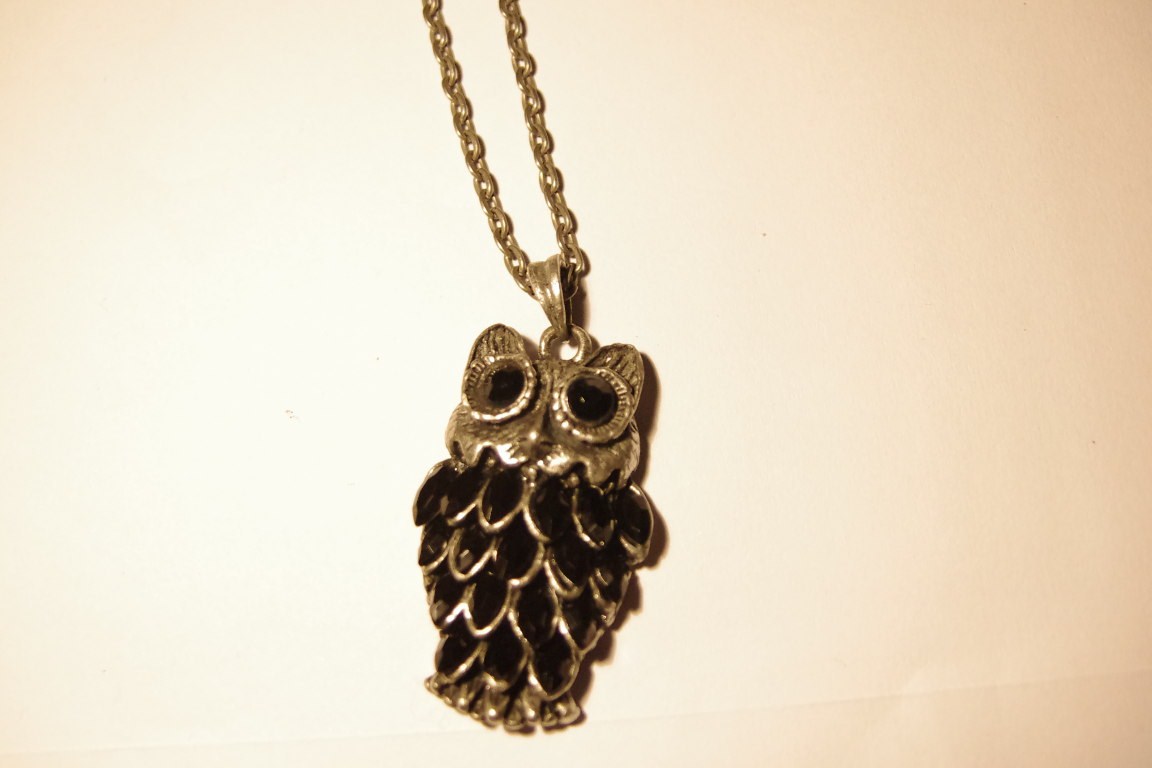
One of my newest discoveries: there is cheap jewelry for sale on ebay. For about $1-3, you can buy very nice and fashionable necklaces, including free shipping from China. Sometimes they look a bit different than in the ebay photo, but only minor differences and they always look nice.

Some examples of things that I bought:

owl; the colors looked less intense on the ebay picture

another owl; it had white diamond eyes on the ebay picture though

octopus

eaten apple

Sunday, October 23, 2011

aquarium update

I added 3 more Endlers, so now I have 9. I think that I'll add 2-3 more, and that should be enough. I really don't want to overstock.


I've also added 2 red ramshorn snails to the tank. They add some extra colour and life, but..they also proliferate like crazy.


Ramshorn snail eggs on the glass. They almost exclusively lay
eggs on the plants, though.


This is how big the babies are, 3 weeks after I put the parents in the tank.
They sure do grow fast.
I also have small pond snails that probably came with my plants. I've started removing all the snail eggs that I can see from my tank, so I don't get a snail plague. But because I also feel bad about just throwing the eggs away, so I put them in a cup next to my window with salvina natans in it and give them small pieces of vegetable as food. I'm hoping that they will start proliferating less rapidly. If not, I'm thinking that I should get one of those cool assasin snails (Anentome helena). Would surely make things more interesting, but I'm not sure that my aquarium is big enough to keep one fed without completely destroying my population of other snails. 

The mondo grass was starting to look bad, so I took it out of my aquarium and planted it with my sanseveria's. As compensation, I added a moss ball to my aquarium. They seem pretty neat, because they are actually algae, they should prevent other algae from growing by competing with them for nutrients. I've  also read that fish sometimes nibble on it, which could help them survive the weekends, when I can't feed them.
My aquarium as it is now. Note the moss ball (right).
As floating plants, I have salvina natans, duckweed and some unknown plant. I got the latter two from the water in which my Endlers were transported. They all seem to be thriving in my aquarium and have grown quite a bit.

Top view of my aquarium